
I LOVE my 2022 F56 JCW Mini Cooper. The ONLY wart was the wireless phone charger installed in the armrest: It takes up a ton of space and it’s still too small to fit today’s larger cell phones (Samsung Ultra, Google Pixel Pro, … nope, I’m not prepared to provide a list of phones that will / won’t work before / after modification; please find that elsewhere).

Part Number: 84102449887
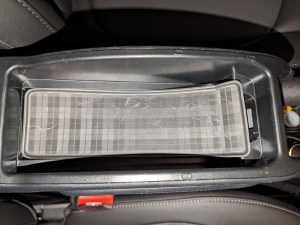
Look how huge this thing is!
So… I decided to remove the charging deck from my armrest since it’s consuming valuable storage space. There are options for modifying the deck to work with larger phones, but they still didn’t work for me, unfortunately.
MODIFYING THE CHARGING DECK
- Option 1: Replacing the rear slider with one that will accept a larger phone (LINK).
- Even with this modification the increased space is STILL too small for my Google Pixel 7 Pro. 😦
- The video notes include a link to the 3D printer file needed to create the replacement slider. I had my slider printed HERE using the “Accura Xtreme” option. The modified slider is also sold on Etsy.
- The video shows how to use credit cards to pop the wireless charging deck out of the armrest tray.
- The video shows how to remove the tray from the armrest.
- This video also shows steps for opening the wireless charging deck, but this isn’t necessary if you’re completely removing the deck from the armrest as I did.
- Option 2: Adding a pair of charging pads where one charges the other and the phone sits atop both of these.
- This was a non-starter; it requires a piece of plastic to turn the charger on, which means it’s either on all the time or it’s more awkward to use than a cable plugged into the USB port! Example: Is your phone too big for armrest charger in newer Mini?
REMOVING THE CHARGING DECK
I decided to fully remove the charging deck from the armrest since it was useless (even with modification) and it consumed valuable storage space. This took some work, but I’m handy and super happy with the results.
Parts you may need:
- “Expanding Rivet” to re-secure the rear “Cup Holder: Center Console: Rear” (51169276513) trim to the center mounting hardware.
- Both of these may need to be replaced if the originals are damaged during removal.
- Part Number: 07149371069
- An option for purchasing: LINK
- Insert Mat: Center Armrest: Fits over inner tray inside armrest to cover gaps, etc.
- Part Number: 51169262853
- Does NOT fit my Mini; this is a rectangular mat whereas my tray tapers towards the front.
- An option for purchasing: LINK
Steps:
See documents for photos (can be printed and saved): Armrest Removal, Charger Removal. Be sure to scroll to the top. The “00 9 340” special tool can be replaced with a thin credit card. Also refer to the modification video and the removal video for more assistance (even though they don’t fully apply).
- Remove “Cup Holder: Center Console: Rear” trim to access wiring harnesses.
- The “MINI phone charger removal | Wireless Charger | Armrest Cradle” video shows the basic concepts.
- Requires removal of expanding rivets on either side of the rear base.
- Use a piece of tape to remove the base of the cup holder to access and remove the torx screw holding the trim in place.
- Disconnect (at least 2) sets of wiring under the trim that route to the armrest.
- Electrical sockets should NOT be forced; examine and locate the method for safely disconnecting sockets without damaging them (scan this video for disconnection steps). The larger socket is removed by sliding the connecting arm out of the way.
- Remove Front and Rear Lower Armrest trim in front and back of armrest bracket.
- Unbolt Armrest to remove the armrest from the car (threading wiring through bracket for removal). Two bolts; one in front and one in back of the armrest. Use a metric socket for easier access.
- Remove wireless charging deck from armrest tray. See the modification video, above, on how to remove the wireless charging deck with credit cards.
- Unscrew the tray from the armrest (4 torx screws). You may have to rotate the charging deck out of the way to access the screws. Again, see the modification video, above.
- Disconnect wiring socket wire from the armrest fan (press on the two exposed metal connectors to pull the socket apart).
- Thread wiring through armrest base and armrest to remove the wireless charging deck
- You’ll have to remove the clips from the base for the wiring to pass through
- The larger modular plug WILL route through the base for removal, but you may need to rotate it and patiently route it through the cylindrical swivel and base.
- Reinstall armrest tray with four torx screws.
- Rebolt armrest to center console.
- Reinstall Front and Rear Lower Armrest Trim pieces.
- Reinstall “Cup Holder: Center Console: Rear”.
- Press front of trim against center console (both sides) when lowering in place so the tab will fit in the slot and stay in place
- You may need to replace the expanding rivets in the rear of the trim (if they were damaged during removal). This will require purchase per details listed above.
- Reinstall torx screw and replace the cup holder base.
- Place the armrest mat into the armrest tray (if a rectangular one is adequate). This will require purchase per details listed above.
CUSTOM ARMREST MAT
But wait! My armrest tray isn’t rectangular like the official Mini / BMW replacement part! What do I do? Well, you can bend the mat to fit over the tapered front end, cut it to fit, or make something yourself.
Or… I used my Glowforge laser printer to create a piece of thick black acrylic to fit the space (complete with a ‘Mini’ logo)!
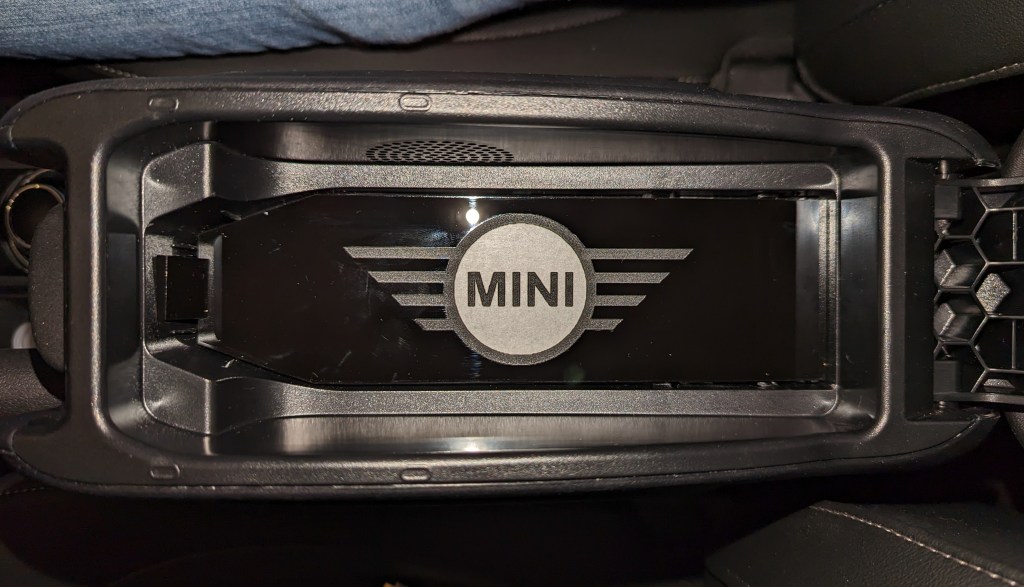
The armrest also has a square hole on the front vertical edge. I included a square filler that I taped to to bottom of the acrylic insert using black electrical tape (set the length of the tape to allow the proper angle without having the square flop inside the tray).
Glowforge users may notice that I kept the adhesive backing in place around the “MINI” text so it would pop! 🙂
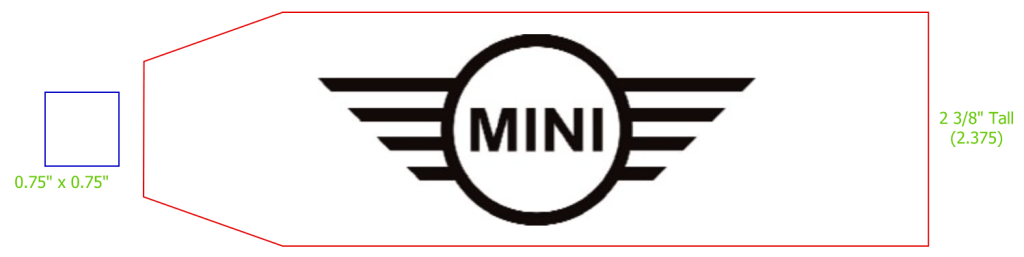
Details
- Link to my SVG file (scale to the dimensions specified). You may have to open in your browser rather than previewing the image; find the link to download.
- Material used: Thick Black Acrylic
Note: This insert fits snugly; you may need to repeat the steps you used to remove the wireless charging module if it needs to be removed.
PLEASE comment with clarifications, etc., but please keep in mind that this posting is specific for the 2022 F56 JCW hardtop 🙂
 WidgetWood
good job, but sad that they have parts to fix an issue instead of just complying with current day sizes of phones!
LikeLike
I wouldn’t say “fix” since it still doesn’t give you a wireless charger in the armrest 😉
LikeLike
Did you have any error messages on the dash once you removed the tray?
I am looking into replacing the whole arm rest with a OEM one (9332831).
Thanks!
LikeLike
Nope, no error message. All was well, and I’ve found there is plenty of space in the armrest now 🙂
LikeLike